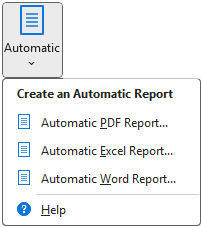
Automatic reports allow you to create reports with the least amount of work possible. With a few mouse clicks, you can make a PDF, Excel, or Word report that includes multiple analyses. (See the article Reports Overview for more information about these formats as well as how Automatic Reports compare with Custom Reports.)
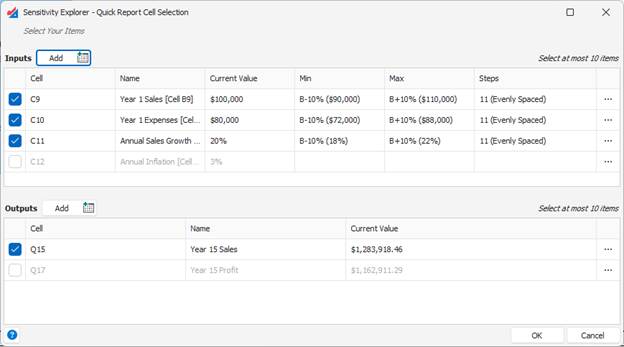
Select Inputs and Outputs
Start by selecting at least one input and one output, using the same interface you are already familiar with for setting up analyses:
Select Analyses
Next select which analyses and result views to include. Please note: Time-Series analyses are not available in automatic reports. If you need to create reports with time-series, you must make a custom report.
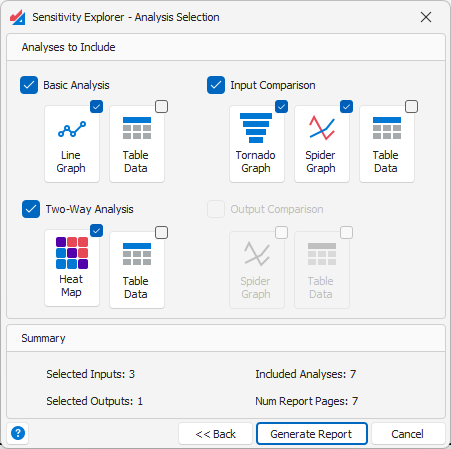
When you click the Generate Report button, Sensitivity Explorer will run the analyses you selected, using the inputs and outputs you previously specified. In some cases, multiple analyses will be run. For example, if you select the Input Comparison analysis, one analysis will be performed for every output, comparing all the inputs. If you select a two-way analysis, one analysis will be performed for every combination of two inputs and one output.
It’s not hard to make very large reports in this way. The Summary section at the bottom of this dialog indicates how many analyses will be performed and how many report pages will be generated.
Choose a Location for the Output File
For PDF and Word reports, you next need to specify the location where the report will be written. After they are created, the reports will automatically be opened in Word or your default PDF viewer.
You do not need to specify a location for an Excel report. It will be created in a new workbook.
Was this article helpful?
That’s Great!
Thank you for your feedback
Sorry! We couldn't be helpful
Thank you for your feedback
Feedback sent
We appreciate your effort and will try to fix the article