The Input/Output Name Popup Editor, accessible by clicking the name drop-down control in any window where Inputs or Outputs appear, allows you to specify an input or output name in several ways.
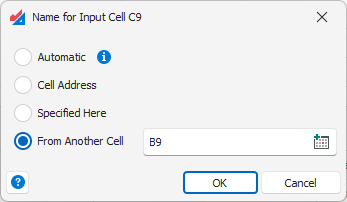
Automatic – this option is the default for all new inputs or outputs. Cells will be labeled in result graphs and tables using their Excel address (e.g. Sheet1!A5) unless there is an Excel defined name for that cell, in which case that will be used instead.
Cell Address – Similar to the Automatic option, except the cell will not use an Excel defined name associated with the cell.
Specified Here – Explicitly specify any name you like.
From Another Cell – Choose another cell in your spreadsheet model which contains a name for the input or output.
See the article Inputs and Outputs Overview for more general information about inputs and outputs.
Was this article helpful?
That’s Great!
Thank you for your feedback
Sorry! We couldn't be helpful
Thank you for your feedback
Feedback sent
We appreciate your effort and will try to fix the article